![zuub logo-3.png]](https://help.zuub.com/hs-fs/hubfs/zuub%20logo-3.png?height=40&name=zuub%20logo-3.png)
Video process introducing this process.
▶️ Beginning Monday, March 3, 2025, issues must be triaged according to the escalation process described below. All issues and feature requests requiring escalation beyond Tier 2 (TechOps) must be communicated to the R&D department via Jira (not Slack), where all priorities, development work, and sprints (two-week work cycles) are managed.
➕ Benefits of the Processes
- Replaces the current method of using any Slack channel, reducing disruptions/noise
- Consider priority and severity before committing to development work
- Easier to keep track of status and measure performance
Escalation Tiers
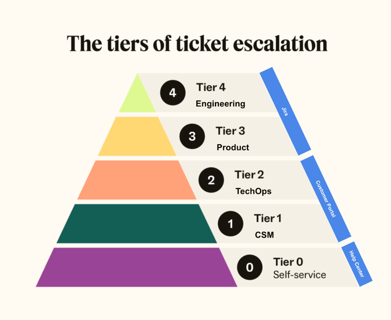
Tier 0 to Tier 2
Triage and investigation within/across Implementation, Customer Success, and TechOps can remain in Hubspot and Slack. Use team and team resources
- Help Center
- Triage of Support Issues
- Internal Knowledge Base
- Search HubSpot, Slack
Tier 2 to Tier 3+
Issues that TechOps determines require further escalation must be entered in Jira following the process below.
Tickets in HubSpot and Jira
HubSpot
- Customer-facing teams continue using HubSpot and customer support mechanisms and processes. However, Product and Engineering do not use HubSpot for customer issues or data related to customer issues.
- Associate Jira ticket(s) to HubSpot ticket(s) – two ways:
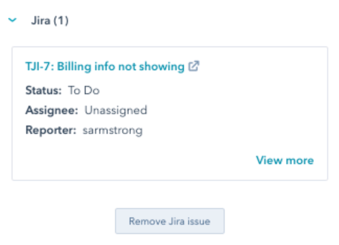
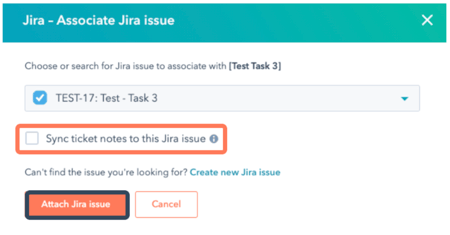
- From the HubSpot ticket, in the right panel, Jira section, click Associate Jira issue. Search for the Jira issue by typing the ID or name. Select the ticket you want to associate. Repeat if there are multiple related Jira tickets (this will be common/normal given our workflow).
- If the Jira ticket does not exist, click Create new Jira issue. Select the Customer Support project.
- NOTE: You must still complete all required fields on the ticket in Jira. Unfortunately, HubSpot does not sync all fields.
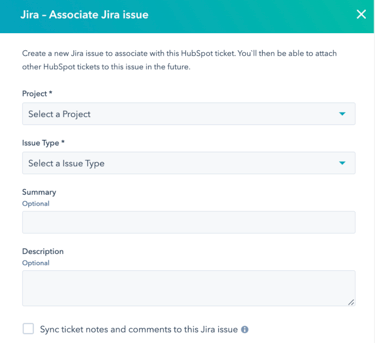
- NOTE: You must still complete all required fields on the ticket in Jira. Unfortunately, HubSpot does not sync all fields.
- NOTE: for both options above, do NOT check “sync ticket notes and comments to this Jira issue.” In testing, this was not found to be helpful but to create more noise in HubSpot.
- From the HubSpot ticket, in the right panel, Jira section, click Associate Jira issue. Search for the Jira issue by typing the ID or name. Select the ticket you want to associate. Repeat if there are multiple related Jira tickets (this will be common/normal given our workflow).
Jira
- Before creating an issue, TechOps should search Jira to confirm it does not already exist. Feel free to comment to provide additional information or ask for clarification if the issue exists. Watch the issue to get updates.
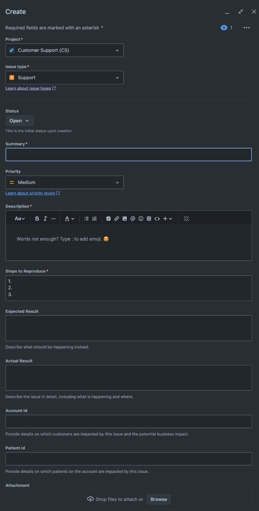
- TechOps can submit a new issue in the Customer Support (CS) project using the support issue type in Jira. All fields are required; use N/A if appropriate.
- The CS Support Ticket Reporter can create a ticket in Draft status if it’s not ready to be escalated to Product/Engineering; Draft is the default status of a new ticket. Tickets in Draft are in the Backlog and will not show on the (triage) board.
-
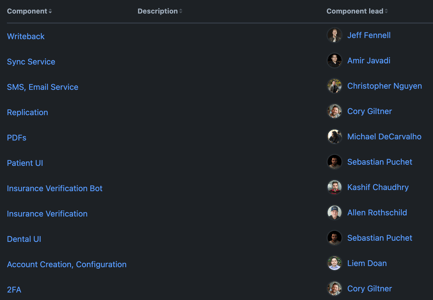
- Component is aligned with the product area or request category and will automatically set the Assignee to the Engineering point person.
- Insurance Verification: Payer is Principal or UHC or goes through DentalXChange (DXC), Stedi, or Availity
- DXC or Stedi: BotRequest.Version = 3
- For retries, if the error references `APIProxyBot`
- Availity: “availity” will be in the Bot ID, e.g., bcbs-tennessee-json-api-availity
- DXC or Stedi: BotRequest.Version = 3
- Insurance Verification Bot: none of the above, and the issue is related to data incorrectness compared to the payer portal/website, error from payer portal, etc.
- Sync Service: attach logs
- PDF or Insurance Verification when Office accessing breakdowns via doc center: attach PDF file from PMS that includes Correlation ID
- Insurance Verification: Payer is Principal or UHC or goes through DentalXChange (DXC), Stedi, or Availity
- Component is aligned with the product area or request category and will automatically set the Assignee to the Engineering point person.
-
- Common Support Categories
- Incorrect IV data compared to the payer portal
- IV bot failure (include Correlation Id)
- UI feature not working as expected
- Account creation: use Highest priority if needed ASAP or High if needed within the day; include kickoff date and other other relevant information
- Common Support Categories
-
-
- Account configuration: use Highest priority if needed ASAP or High if needed within the day
-
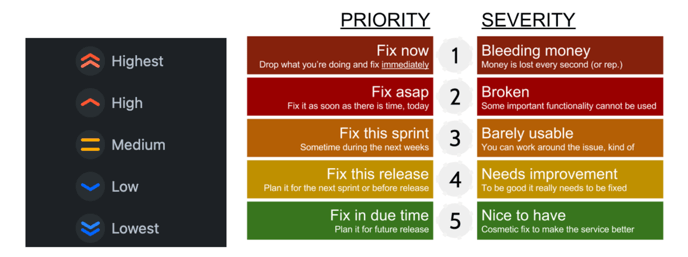
- Product triages issues with special attention given to issues deemed high priority; use your best judgment with the Priority/Severity table below on the right to set the Priority of the issue on the left.
- If Priority is Highest/High, please explain in the Description (e.g., what is the impact of this issue)
- Priority will be adjusted by Product & Engineering if determined to be different after investigation.
- SLAs/Response Time Expectations
- The above aligns mostly with General Zuub SaaS SLA, especially for Highest and High. Medium, Low, and Lowest will be prioritized accordingly. We’ll adjust the process and/or SLAs in the future if necessary.
- NOTE: When a Highest/High issue is created, a Slack notification will automatically be sent to
- #engineering for all Components != Insurance Verification
- #engineering-iv when the Component = Insurance Verification
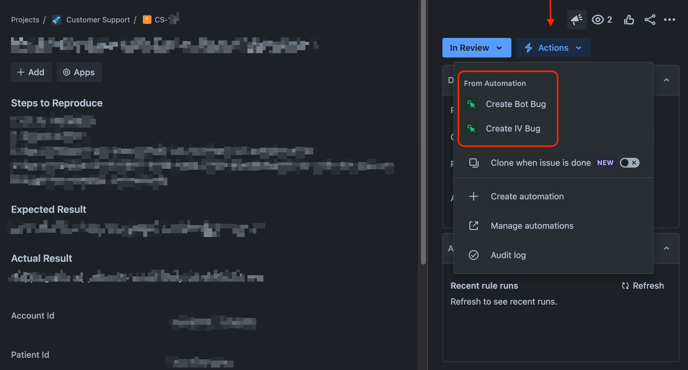
- Upon triage, if the issue requires further investigation or development work, it will be “sent to dev” by creating a separate bug ticket (see (a) below) with the appropriate team and providing the details and any additional data from triage. The bug will be linked to the original support ticket, labeled <CSTechSync>, and set to Done | Sent to Dev.
- [Product/Engineering] In the Actions menu, select Create BOT or IV Bug. When the automation is complete, a ticket is created and automatically linked to the CS ticket. The CS ticket is transitioned to “Done” and Resolution = Sent to Dev.
- Update the new ticket:
- Set Status = Dev To Do
- Set Sprint according to Priority and SLAs above; e.g., select the active Sprint if Priority is Highest/High.
- Add CSTechSync label.
- Add relevant Watchers to the bug ticket. Other interested parties should watch the bug ticket for updates. Note: The Watcher must be a Jira user.
- Click here to view all tickets labeled CSTechSync. Note: this filter/view does require Jira access.
- [Product/Engineering] In the Actions menu, select Create BOT or IV Bug. When the automation is complete, a ticket is created and automatically linked to the CS ticket. The CS ticket is transitioned to “Done” and Resolution = Sent to Dev.
- If the issue does not require further escalation, set it to Done and select the appropriate Resolution.
Feature Requests
- Access: Marketing, Sales, Implementation, CSM, TechOps
- Before creating an idea, search to confirm it does not exist. If it does, add a comment to upvote it, provide additional information, or ask for clarification.
- To submit a new feature request in the Zuub RCM (ZUUB) project, use the Idea template in Jira (Product Discovery) to submit a new idea. All fields are required.
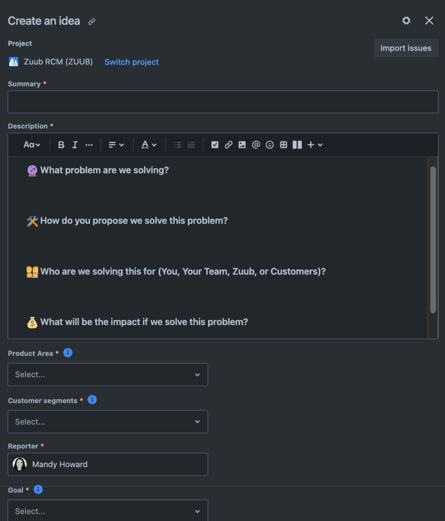
- Product reviews requests at least monthly to determine if the request should be prioritized in the near term or revisited later.
Jira Notifications
- Gmail: Email notifications are ON by default. The sender is <jira@zuub-team.atlassian.net>. We recommend setting up a filter in Gmail to capture these notifications in a specific folder you can find easily.
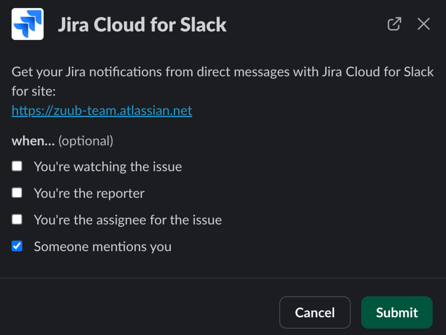
- Slack Jira App. Turn on and configure personal notifications however you want.
FAQs
- Can I escalate an issue to Product & Engineering (including Arbisoft) via Slack?
- No, evolving the issue triage process is to use knowledge and resources to address issues or determine if higher escalation is required.
- #tech-support will be archived, and TechOps will work tickets out of HubSpot per current processes
- Customer-specific channels can remain, but issue escalation still applies
- Slack User Groups
- @techops (Jeremy, Paul) can be used to communicate with TechOps on Slack as needed
- @techsupport (Jeremy, Liem, Luka, Paul) will be deactivated
- @productteam (Gene, Jonathan, Luka, Mandy) should be used for...
- What about requests for account creation or account configuration?
- Follow the Jira Ticket workflow above; see (2).
- Can I create a Jira issue from Slack?
- Yes!
- How do I check the status of an issue?
- First, check the Jira ticket. To view all tickets labeled CSTechSync, click here. Note that this filter does not require Jira access. If you have questions not answered in the ticket, ask TechOps.
- Who updates the CSM and/or the customer?
- TechOps updates the CSM via HubSpot and/or Slack. The CSM updates the customer.
- What if the issue or feature request is from a DSO or a customer in a trial period?
- TLDR: like any process, we will make exceptions. Include this context in the request so it can be used in decision-making.
- For example, Implementation is preparing to take DSO-A live and will train the customer in the coming days. We want to ensure a positive first impression, particularly for data availability, correctness, and minimal errors (unless they are relevant). Or SMB-B is live in a trial period experiencing issues with IV or has a feature request that’s been asked for by other customers.
- When TechOps requires an engineer to help investigate an issue on a server, is a ticket required?
- No. To decrease friction with this specific use, TechOps can ping Engineering. TechOps should open any bugs that surfaced from this investigation.
- How does Implementation (IM) communicate issues that need investigation (e.g., found in health checks days before training)? Previously done via Slack.
- Create in HubSpot for TechOps (set Pipeline = Support Pipeline; set Priority) and, if needed, these will get escalated via Jira. One issue per ticket.
- When does a HubSpot ticket get closed?
- When the issue is resolved or canceled.
- Who should the default TechOps assignee be for tickets in HubSpot in the Support Pipeline (escalating from CS to Support)?
- Paul
Document/Process Version History
| Version | Modified Date | Summary of Changes |
| 1 | Mar 3, 2025 |
Initial version, rollout |
| 2 | Mar 26, 2025 |
|
| 3 | Mar 28, 2025 |
|