
Quick Links:
Input Insurance Member IDs in Eaglesoft for Zuub Verification: Step-by-Step
Input Insurance Member IDs in Eaglesoft for Zuub Verification: Step-by-Step
Please follow these steps to input insurance member IDs in Eaglesoft for Zuub verification:
Step 1 - Fill out the Patient's Basic Information
- Navigate to the New Person screen in Eaglesoft.
- Complete all required fields, including:
- First Name, Last Name, Birth Date
- Address, Phone, Email
- Insurance Details (Primary/Secondary)
- Policy Holder Name
- Insurance Company
- Relationship to Patient
Note: Zuub cannot read the Social Security Number field—always use the Primary Member ID field instead.
Step 2: Enter the Insurance Member ID
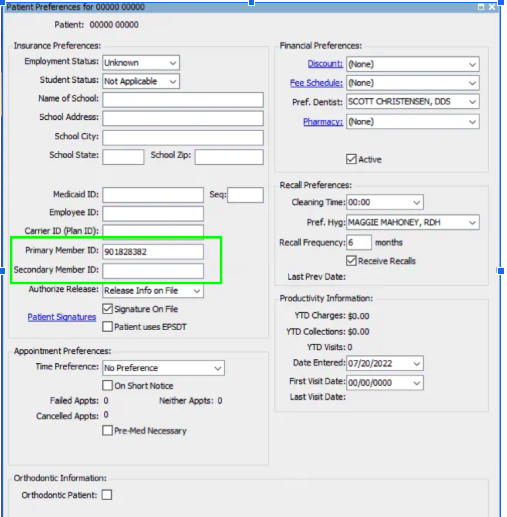
- After filling out the patient’s basic information, click on:
- Preferences (located at the bottom of the patient profile).
- In the Preferences section, locate:
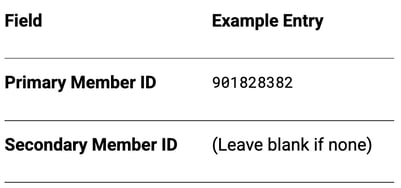
- Primary Member ID (for primary insurance)
- Secondary Member ID (if applicable)
- Enter the Member ID (or SSN, if required by the insurer) in these fields.
Why this matters:
- Zuub uses this field to verify insurance eligibility.
- An incorrect or missing Member ID will cause verification failures.
Example of correctly filled Preferences
Troubleshooting Tips
❌ Don’t enter the Member ID in the Social Security Number field—Zuub cannot read it there.✅ Do double-check that the Member ID matches the insurance card exactly.
🔄 If Zuub still fails to verify, confirm that:
- The insurance plan is active.
- The Policy Holder details match the insurer’s records.
Need Additional Help?
If you encounter issues, contact:
- Zuub Support:
- support@zuub.com
- Chat via Zuub portal
- Phone: 213-645-2813
- Video Resource: New Patient Setup - Eaglesoft v16 Tutorial
This resource was updated 5/30/2025.