Verify Medicaid Day of Appointment
Medicaid payers can be configured to automatically verify eligibility on the day of the patient’s appointment. Please contact Zuub Support to configure.
Automatically Verify New Appointments
When an appointment is synced to Zuub from PMS, that is for the same day or the next day because it was newly scheduled or rescheduled, insurance verification (IV) will be automatically triggered when all required data (payer is mapped and patient insurance data) is valid and available, when a new appointment is created, an existing appointment is rescheduled to a different day.
IV is not triggered
- if time, provider, procedures, operatory, tooth number, or surface change
- if appointment status is 'broken,' 'cancelled', 'complete, ' or 'deleted'
New PDF Design: All Networks, One Document
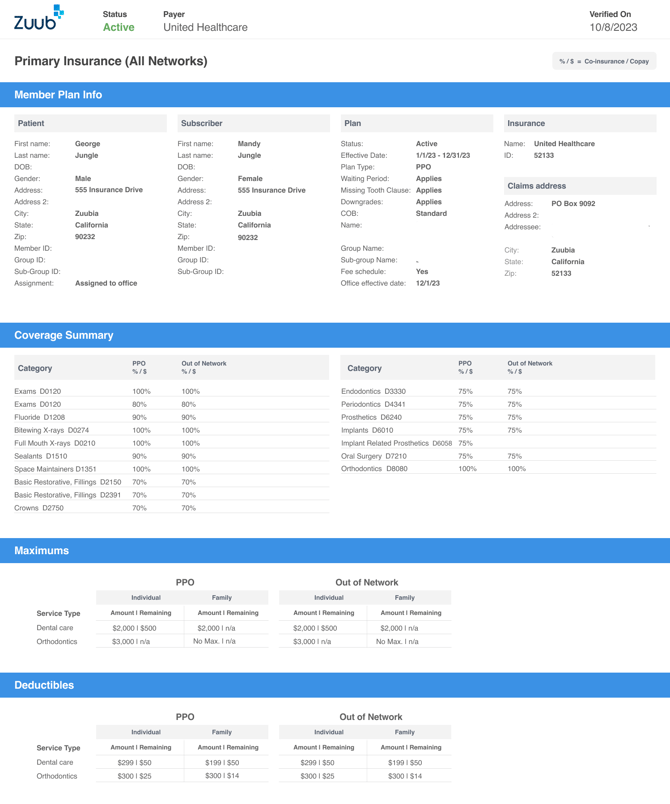
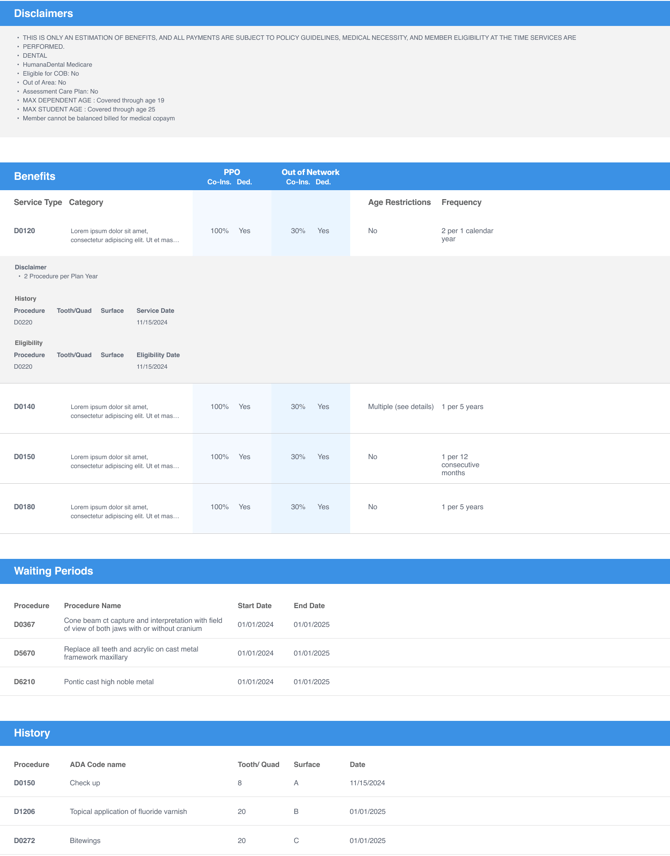
When a PDF is generated for a successful insurance verification, the PDF includes eligibility and benefits data for all networks (up to four) in the patient’s plan in a single document. For example, if a patient has both in-network and out-of-network benefits in their plan, the benefits for both networks are provided side by side in the PDF. The redesign applies to all PDFs, regardless of where they are accessed (dental UI, PMS), except for Denti-Cal.
Clearer PDF Filename
When a PDF is generated for a successful IV and uploaded to the PMS or downloaded from the Zuub portal, the filename uses a friendlier and informative format: Zuub IV_<IV timestamp>_<PayerName>_<PatientName>_<patientdob>-<Primary/Secondary>_<officeid>_<patientid>
IV Timestamp is the date and time of insurance verification.
For example, Zuub IV_2025-07-01-T15:28:55_Principal_GeorgeJungle_19990101_Primary_17004906_1234.pdf
Spot Data Mismatches Between PMS and Payer
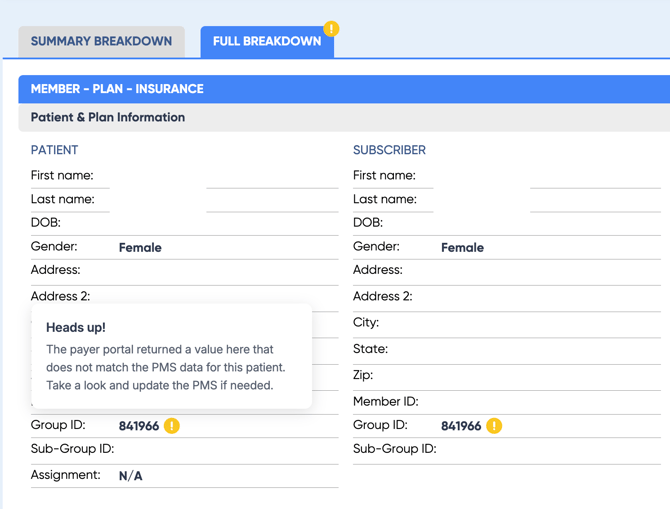
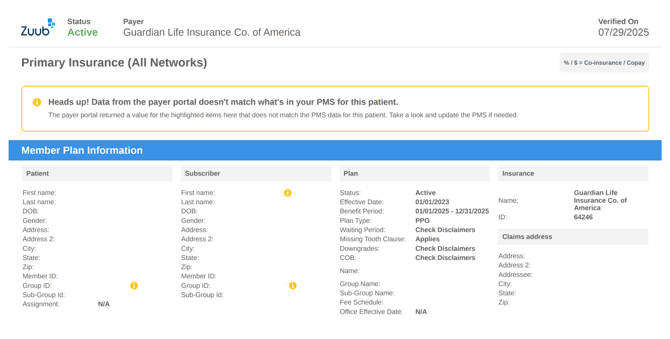
When the payer portal displays a different value for patient and subscriber data compared to the PMS, a  badge icon (yellow with an exclamation point) appears on the full breakdown in the dental UI and PDF (automated and manual verification) on any field where a mismatch has been identified. A message informing the user that the value from the payer portal (what is being displayed in the breakdown) does not match the PMS (what was synced to Zuub and used in the IV request) appears as a tooltip (UI) or message (PDF).
The relevant fields for patient and subscriber are first name, last name, DOB, Member ID, and Group ID.
- The comparisons are not case-sensitive, meaning if the PMS has “SMITH” and the payer portal has “Smith”, this is not considered a mismatch.
- If a data point is in Zuub (synced from the PMS) but not in the payer portal, this is also not considered a mismatch.
- If a data point is not in either system, this is not considered a mismatch (e.g., Group ID).
- If the insurance verification request has a dependent as the Subscriber and the result (payer portal) has another person as the Subscriber, this is considered a mismatch.